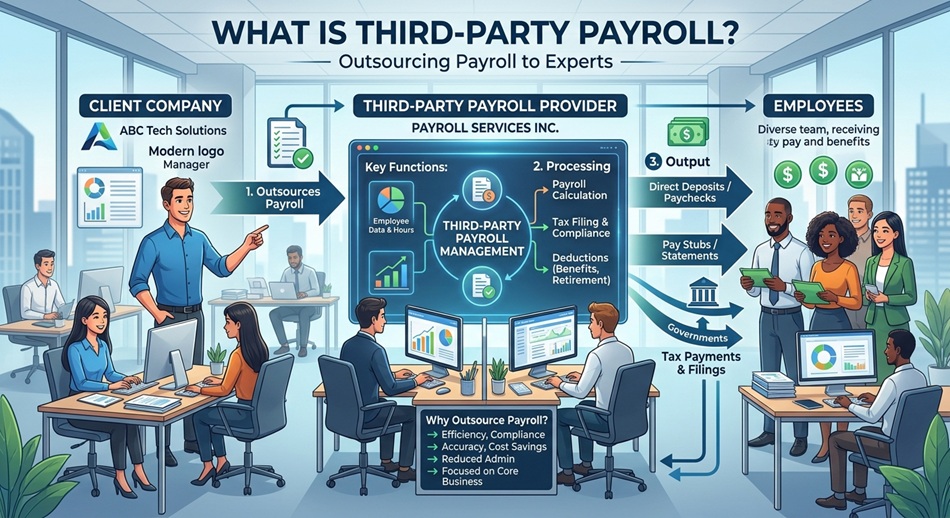
Benefits of Cloud Payroll Software

Cloud payroll software runs entirely online rather than on a server in your office, which is what makes automatic statutory updates, remote access, and lower upfront cost possible in the first place. The real difference isn’t marketing language like “flexible” or “efficient”; it’s specific, measurable gaps between cloud, on-premise, and manual processing that are worth knowing before you choose.
The Real Numbers: Cloud vs. Manual Processing
Processing payroll manually for around 50 employees typically takes 2-3 full working days. A properly configured cloud system can do the same run in under 30 minutes. That gap compounds every single month, and it’s the actual reason “time-saving” shows up on every vendor’s feature list, not a vague efficiency claim.
On cost, cloud payroll generally runs cheaper than on-premise once you account for the full picture: no server hardware to buy, no dedicated IT staff to maintain it, and no capital expenditure sitting on your books. Businesses commonly report cost reductions in the range of 30-40% versus running payroll on owned infrastructure, though the exact number depends heavily on your current setup. Air India’s move to a cloud payroll platform is a concrete, large-scale example: the airline reported roughly $1 million in annual savings after the transition.
| Manual / Spreadsheets | On-Premise Software | Cloud Payroll Software | |
|---|---|---|---|
| Upfront cost | Minimal | High (hardware, licenses) | Low (subscription-based) |
| Time for a 50-employee run | 2-3 working days | Several hours | Under 30 minutes |
| Statutory rate updates | Fully manual | Manual patch/update | Usually automatic |
| Access | Wherever the file is | Office network only | Any internet-connected device |
| Scaling up | Gets unmanageable fast | New hardware/licenses needed | Pricing-tier change |
| Who secures the data | You, entirely | You, entirely | Shared: vendor infrastructure + your DPDP obligations |
Automatic Statutory Compliance Updates
This is the benefit that actually matters most in India and gets the least attention. PF wage ceilings, ESI contribution rates, professional tax slabs, and TDS rules all change periodically, and a decent cloud payroll platform pushes these updates automatically rather than requiring someone to manually recalculate formulas every time a rate shifts. For the current India-specific rates (EPF, ESI, professional tax), see our breakdown in what a payroll management system actually does.
Missing a statutory update isn’t a minor inconvenience; it’s one of the most common sources of compliance penalties in Indian payroll, and it’s precisely the kind of error that a properly maintained cloud platform is built to prevent.
Real Security Benefits (Not Just “Encryption”)
Cloud vendors run dedicated data infrastructure, often with security certifications and audit practices that a typical company’s in-house server setup can’t match. That matters specifically under India’s DPDP Act, since payroll data (salary, bank details, sometimes health and biometric data) counts as sensitive personal data with real consent and retention obligations attached. A reputable cloud vendor’s infrastructure and access controls make that compliance job meaningfully easier, though the legal responsibility for the data still sits with you as the employer, not the vendor.
Two specifics worth checking with any vendor rather than assuming: where the data is actually hosted, since India’s data localization rules require certain categories of data to stay within Indian borders and restrict cross-border transfer to government-permitted jurisdictions, and whether you have a signed Data Processing Agreement (DPA) with them. Without a DPA in place, every transfer of employee data to that vendor is technically a compliance gap, not just a formality you can skip.
Access control matters as much as encryption in practice: role-based permissions, audit trails showing who viewed or changed what, and centralized login management all reduce the real-world risk of a former employee or the wrong staff member seeing salary data they shouldn’t. Most cloud platforms also give employees self-service access to their own payslips and Form 16, which cuts down the steady stream of “can you resend my payslip” requests HR would otherwise field manually.
Remote and Hybrid Access
With HR and finance teams increasingly distributed across cities, or even fully remote, cloud payroll removes the “someone has to be in the office to run this” constraint entirely. Approvals, corrections, and reviews can happen from wherever the relevant person actually is, which matters more now than it did when most payroll teams worked from a single office.
Scalability Without Hardware Investment
Growing from 20 to 200 employees on an on-premise system usually means new hardware, new licenses, and real IT project work. On a cloud platform, it’s typically a pricing-tier change, since the underlying infrastructure scales on the vendor’s side, not yours.
When On-Premise Still Makes Sense
Cloud isn’t the right answer for every situation, and a fair comparison should say so. Organizations in highly regulated or security-sensitive sectors sometimes have genuine reasons to keep data fully on infrastructure they physically control. Companies with unreliable internet access in their primary location face a real practical constraint. And a business that’s already sunk significant investment into a functioning on-premise system may not see enough marginal benefit to justify a costly migration right now. None of this is common, but it’s not nothing either.
What to Check Before Switching
Beyond price, confirm the data migration process (how your existing employee and historical payroll records actually move over), what happens to your data and export rights if you switch providers again later, the vendor’s uptime track record, and whether the platform genuinely auto-updates statutory rates or just claims to. If you’re also evaluating broader HRMS integration, our HRMS vendor evaluation checklist covers the same questions in more depth, and see our guide on integrating payroll with the rest of your HR software if attendance, leave, and payroll currently live in separate systems.
Frequently Asked Questions
Is cloud payroll software actually cheaper than on-premise?
Usually, once you account for the full cost: no server hardware, no dedicated IT maintenance staff, and no capital expenditure. Reported savings commonly fall in the 30-40% range versus running payroll on owned infrastructure, though the exact figure depends on your starting setup.
How much faster is cloud payroll than manual processing?
Substantially. Processing payroll manually for around 50 employees typically takes 2-3 working days; a well-configured cloud system can complete the same run in under 30 minutes.
Does cloud payroll software automatically update PF and ESI rates?
A properly maintained cloud platform should, and this is one of its most valuable features, since manually tracking statutory rate changes is a common source of compliance penalties in India. Confirm this specifically with any vendor, since not all platforms handle it equally well.
Is cloud payroll data actually secure?
Generally yes, often more so than a typical in-house server setup, since cloud vendors run dedicated infrastructure with security certifications most companies can’t replicate internally. That said, legal responsibility for the data under India’s DPDP Act still rests with the employer, not the vendor.
Is on-premise payroll software ever the better choice?
In specific cases, yes, mainly for organizations in highly regulated or security-sensitive sectors that need direct physical control over data, or companies with unreliable internet access at their primary location. For most businesses, cloud is the more practical default.
What should I check before switching to a cloud payroll provider?
How your existing records will migrate, your data export rights if you switch providers again later, the vendor’s actual uptime history, and whether statutory rate updates are genuinely automatic rather than a marketing claim.
Can cloud payroll software integrate with other HR systems?
Most modern platforms support integration with attendance, leave, and broader HRMS tools, which matters for avoiding duplicate data entry across systems. Confirm whether it’s a native integration or a manual export/import process before assuming it’s seamless.
Is cloud payroll suitable for a small business with under 20 employees?
Yes, and arguably it’s where the cost advantage is most pronounced, since a small company has the least ability to absorb the fixed overhead of on-premise hardware and dedicated IT support.
Does my payroll data have to stay in India?
Certain categories of data are subject to India’s data localization requirements, and cross-border transfer is restricted to jurisdictions the government permits under the DPDP Act. Ask any vendor directly where your data is actually hosted rather than assuming, and make sure you have a signed Data Processing Agreement with them.
If you’re evaluating options, see our side-by-side payroll software comparison, or our broader HR software comparisons covering attendance, recruitment, and performance management too.

- Best Staffing and Recruitment Agencies in India - September 15, 2026
- Right to Disconnect in India: Where the Law Actually Stands - September 15, 2026
- AI in HR and Recruitment: What’s Actually Real in 2026 - September 15, 2026